


TL;DR
Firecrawl vs a custom scraping engine is a choice between fast access and source-specific ownership. Choose Firecrawl when standard endpoints return acceptable markdown, JSON, or browser-driven output from your representative sites. Choose a custom engine and team when the business depends on exact schemas, per-domain behavior, repair ownership, and accepted-result SLAs. Use both when most sources are standard but a difficult minority drives failures or cost.
Introduction
Firecrawl can turn a URL into clean content with one API call. A custom engine can tune collection, extraction, and monitoring around one data product. Neither approach wins every workload.
The practical gap sits between a fetched page and an accepted business record. Your team still needs to decide which fields must exist, how fresh the data must be, what counts as failure, and who repairs a source after it changes.
This comparison uses current Firecrawl Cloud documentation and Pinobyte's managed custom-engine model. It focuses on operating fit rather than feature-count scoring.
What Firecrawl Includes in 2026
Firecrawl now covers more than page-to-markdown conversion. Its v2 API includes Search, Scrape, Interact, Parse, Monitor, Crawl, Map, and an agent endpoint. Scrape can return markdown or structured JSON. Interact adds clicks, forms, navigation, and code execution for workflows that need a browser.
Firecrawl also has a documented escalation path. Enhanced Mode defaults to auto, which tries a basic proxy first and retries with an enhanced option if needed. The documented cost moves from 1 credit for a basic success to 5 credits when enhanced access succeeds. Code-only Interact sessions cost 2 credits per browser minute; AI-prompted sessions cost 7, plus the original scrape.
As of August 2026, the hosted pricing page lists 1,000 free credits per month. Annual self-serve plans list 5,000 credits at $16 per month, 100,000 at $83, and 500,000 at $333. The Scale plan lists 1 million credits at $599. Enterprise adds custom capacity, dedicated support, and an SLA.
Those capabilities matter because an honest Firecrawl alternative comparison cannot treat Firecrawl as a plain HTTP wrapper. It already handles standard crawling, browser interaction, structured output, and enhanced access through one interface.
Where Firecrawl Wins
Firecrawl is the stronger starting point when you need first data quickly. A product team can test a RAG corpus, research agent, monitoring idea, or content pipeline without building queue workers, browser infrastructure, and proxy operations.
It fits best when:
- The output is clean page content or a schema that works across many standard sites.
- Known URLs, site maps, or web search define the collection scope.
- Your team can own orchestration, validation, and downstream retries.
- Monthly credit tiers match the workload.
- A hosted API and vendor-defined controls satisfy governance requirements.
The same logic applies to a proof of concept. Fast feedback has more value than early infrastructure ownership. Pinobyte's broader web scraping tools comparison covers other tool categories that can fill the same role.
Where a Custom Engine and Team Win
A custom engine becomes useful when the data contract matters more than the page response. The system can give each domain its own extraction, validation, refresh, and repair strategy while keeping one schema for downstream consumers.
A managed team also owns work outside the request itself: source onboarding, monitoring, incident response, data-quality checks, integration with storage or business systems, and changes to source behavior. A multi-engine escalation layer can route requests without exposing those mechanics to the product team.
This model fits recurring feeds, price or inventory monitoring, lead pipelines, and operational products where missing fields or late refreshes create business incidents. Pinobyte's published multi-channel aggregator case study reports eight sources and more than one million scraping requests per day.
Custom delivery costs more to start and needs clear scope. It earns that cost when per-site exceptions, downstream integration, and repair ownership would otherwise become an internal scraping team.
Firecrawl vs Custom Engine: Honest Comparison
| Dimension | Firecrawl Cloud | Custom engine plus team | Buyer question |
|---|---|---|---|
| Time to first data | Hours or days for standard workflows | Starts with discovery and a representative-source pilot | How soon must the product test demand? |
| Standard sites and docs | Strong fit for crawl, markdown, JSON, and search | Works, but custom delivery may add unnecessary setup | Is clean content already the product? |
| Browser workflows | Interact supports prompts or code | Per-domain flows can be built and maintained | Are interactions reusable across sites? |
| Difficult source mix | Basic-to-enhanced escalation through a common API | Multi-engine and per-domain strategies under one acceptance contract | Do a few sources drive most failures? |
| Schema control | JSON extraction and application-side validation | Source adapters map into a shared business schema | Can one schema prompt cover the portfolio? |
| Maintenance | Vendor owns platform; buyer owns data acceptance and orchestration | Managed team owns agreed source repairs and monitoring | Who gets called when records disappear? |
| Cost model | Credits vary by endpoint and feature | Scope, volume, SLA, and accepted-result terms | Are you paying for requests or usable records? |
| Control and portability | Hosted interface; self-hosting changes feature coverage | Deployment, storage, and interfaces can match the product | Is collection infrastructure strategic IP? |
The comparison is not "API versus anti-bot expertise." Firecrawl already offers enhanced access and browser tooling. The custom advantage is control over source-specific behavior and operational responsibility.
Match the Starting Point to the Use Case
| Use case | Start with | Why | Reconsider when |
|---|---|---|---|
| RAG or documentation ingestion | Firecrawl | Crawl and markdown output reduce setup | Page-level exceptions require frequent repair |
| Prototype from known public URLs | Firecrawl | One interface reaches first data quickly | Acceptance failures block the product test |
| Research agent with search and browsing | Firecrawl | Search, Agent, and Interact cover discovery and navigation | Repeated tasks need fixed schemas and predictable unit economics |
| Recurring operational feed | Custom engine plus team | Source adapters, validation, monitoring, and repair share one owner | Sources become simple and standardized |
| Product where collection is core IP | Custom engine, often in-house | Control and portability justify platform ownership | The platform distracts from the product |
| Mixed portfolio | Hybrid | Use Firecrawl for standard sources and custom paths for exceptions | One path proves reliable and cheaper across the full set |
Ask Five Questions Before You Choose
- What is the accepted unit? Clean markdown, a page-level JSON object, or a normalized business record with required fields?
- How representative is the pilot? Include a standard page, a JavaScript workflow, and the source most likely to fail.
- Who owns repair? Name the team responsible for missing fields, source changes, retries, and incident response.
- What consumes budget? Model basic credits, enhanced attempts, browser minutes, extraction features, and internal maintenance.
- Is the engine strategic? If collection differentiates the product, ownership may matter more than time to first data.
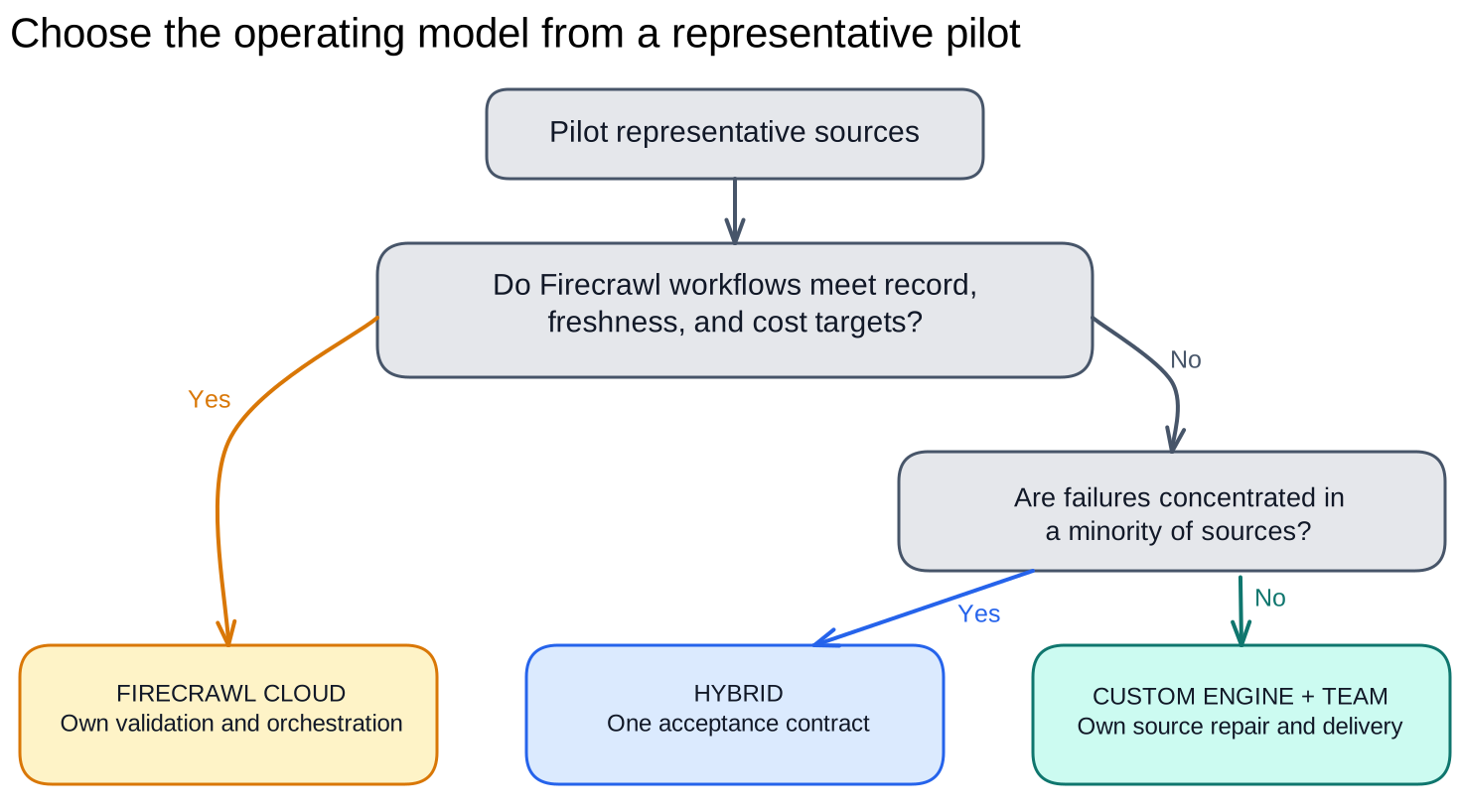
Figure 1. Representative-source fit and operational ownership determine the starting path.
Pinobyte's build-versus-buy framework expands the ownership question across APIs, in-house platforms, and managed teams.
Treat Billing and Failure as Separate Questions
Firecrawl states that it does not charge for failures on its side, such as timeouts or server errors. It can charge when it fetched a page successfully even if the target returned a 4xx or 5xx response. Self-serve plans also use monthly credits rather than pay-as-you-go billing.
That policy is reasonable for infrastructure usage, but a buyer may define success differently. A response can be technically fetched and still fail the required-record contract. For applicable Pinobyte engagements, no-charge-on-failure terms can align billing with accepted delivery; the exact definition belongs in the proposal and SLA.
Compare both models with the same denominator: accepted records or completed refreshes, not raw requests.
What a Managed Custom Engine Adds
A managed team pairs scraping specialists with an existing collection platform. Pinobyte builds each engagement on its in-house engine, which supplies request routing, browser execution, sessions, retries, validation, and monitoring. Engineers can focus on source logic instead of rebuilding the collection layer for every source.
You define the sources, fields, freshness, acceptance rules, and delivery contract. Pinobyte implements the source logic, operates the multi-engine escalation stack, monitors runs, and repairs integrations when source behavior changes. Your team owns the data contract and business priorities; Pinobyte owns collection operations and agreed repairs.
Conclusion
Firecrawl is a strong first choice when its documented endpoints fit representative sources and your team can own data acceptance. A custom engine and team fit recurring business data that needs per-domain behavior, integration, monitoring, and repair ownership.
Run the same pilot against both options. Measure accepted records, completed refreshes, latency, manual intervention, and cost per accepted result. Choose the operating model that assigns failures to the team prepared to fix them.
FAQ
Is Firecrawl suitable for production web scraping?
Yes, when representative sources fit its Scrape, Crawl, Enhanced Mode, or Interact workflows and your team validates the output. Enterprise plans advertise dedicated support and an SLA. Production fit still depends on source coverage, data acceptance, and cost behavior.
Is a custom scraping engine cheaper than Firecrawl?
Not at the start. Firecrawl usually reaches first data with less setup. A custom engine can become more efficient when recurring enhanced requests, browser minutes, source-specific repairs, or downstream integration dominate the total cost.
Can Firecrawl handle JavaScript and protected pages?
Firecrawl documents browser interaction and basic-to-enhanced proxy escalation. Coverage varies by source and workflow, so test representative pages and validate records rather than assuming either success or failure from a feature list.
Should I self-host Firecrawl instead of building a custom engine?
Self-hosting gives you more deployment control, but Firecrawl's guide says self-hosted instances lack Fire-engine capabilities for advanced IP-block and robot-detection handling. You also assume infrastructure and maintenance work. Treat it as a third operating model, not free cloud parity.
What should a Firecrawl comparison pilot measure?
Measure accepted records, required-field completeness, completed refreshes, latency, credit use, browser minutes, manual intervention, and repair time. Include the hardest permitted source, not only a documentation site.

