


Across Pinobyte's hard-target work, curl_cffi handled about 80% of protected resources after engineers tested several impersonation profiles instead of stopping at the default. In one Cloudflare run, chrome produced almost no usable responses while firefox144 reached about 80% under matched request and IP conditions. Profiles such as chrome, chrome120, and firefox144 select different browser connection patterns. Test a small profile matrix before paying the cost of a browser.
Introduction
Web scraping can work without browser impersonation. A standard HTTP client may collect open pages and some protected pages. Stricter protection increases blocked requests, CAPTCHAs, retries, and browser fallbacks. Parsing remains possible, but the operating cost can make the pipeline ineffective at production scale.
Many teams try curl_cffi once with impersonate="chrome". When that request fails, they conclude that the target requires a browser or a new proxy path. That conclusion ignores the profile dimension.
curl_cffi supports generic browser aliases and pinned browser versions. A different Chrome version can produce a different connection pattern. Moving from Chrome to Firefox changes the browser family as well. On a protection system that weighs client identity, that small configuration change can move a request from near-zero usable responses to a stable HTTP path.
Pinobyte uses a profile sweep before browser escalation. The approach keeps the direct HTTP path available for the large share of protected resources that do not require JavaScript execution or browser-bound state.
One Failed Profile Does Not Mean curl_cffi Failed
A request carries more than a URL, headers, cookies, and a body. The client also creates the TLS connection, negotiates HTTP/2 behavior, and sends browser-family headers. Protection systems can combine those signals into a network identity.
curl_cffi packages connection settings into impersonation profiles. Passing a profile through the impersonate parameter changes the connection pattern without launching a browser. Two profiles can send the same request through the same IP and receive different decisions from the protection layer.
Treat the default profile as the first candidate. Test at least one pinned Chrome profile and one Firefox profile before you discard the direct request path.
What chrome, chrome120, and firefox144 Mean
A useful starter set covers two comparisons: a moving Chrome baseline against a pinned Chrome fingerprint, then Chrome against Firefox.
| Profile | What it selects | How to use it in a sweep |
|---|---|---|
| chrome | Alias for the latest Chrome profile available in the installed curl_cffi version | Use as the moving baseline and log the library version |
| chrome120 | Pinned connection profile for Chrome 120 | Compare a fixed Chrome fingerprint with the generic alias |
| firefox144 | Pinned connection profile for Firefox 144 | Add a cross-family candidate when Chrome profiles fail |
Table 1. Generic and pinned curl_cffi profiles serve different roles in a controlled sweep.
The generic chrome alias follows the latest profile as curl_cffi updates. That behavior helps general use, but an upgrade can change the effective fingerprint. A pinned name such as chrome120 makes a test easier to reproduce.
Pinned profiles also let you compare fingerprints within one browser family. The available versions mark meaningful fingerprint changes, which makes a small set of distinct profiles more useful than a long sequence of adjacent browser releases.
Pinobyte's Field Findings
Pinobyte engineers measured each profile under matched request and network conditions. They changed the impersonation profile while holding the endpoint, request data, headers, cookies, rate, and IP cohort constant.
| Security provider and protection pattern | First profile | Alternative profile or flow | Measured result | Engineering conclusion |
|---|---|---|---|---|
| Cloudflare TLS gate | chrome | firefox144 | Usable responses moved from about 0% to about 80% per IP | A cross-family profile test recovered the direct HTTP path |
| DataDome TLS-gated server-rendered route | chrome120 | firefox144 | chrome120 returned 0/6; firefox144 returned usable content in about 7/10 tries | The provider exposed a route where a Firefox profile beat the Chrome baseline |
| Akamai Bot Manager on a cold deep request | chrome120, chrome142, firefox144, and safari184 | Browser-established session flow | Direct profile runs stayed near 0%; session establishment enabled later HTTP requests | A profile sweep exposed a missing session capability rather than a profile mismatch |
Table 2. Pinobyte field findings grouped by security provider and protection pattern.
Pinobyte measured the size of the Cloudflare profile effect under constant request and IP conditions. The browser-family identity changed, and usable responses rose from almost none to about four out of five tries.
Pinobyte also found different DataDome protection regimes across routes. A Firefox profile kept a server-rendered route on the cheap HTTP path, while stricter interstitial flows still needed browser capabilities.
Across Pinobyte's hard-target workload, this profile-first process kept about 80% of protected resources on curl_cffi. Most resources did not need a browser for each request once the team tested more than one profile.
Why a Profile Change Can Alter the Result
An impersonation profile affects the TLS handshake, HTTP/2 settings, and related browser-family headers. Protection systems compare those signals with IP reputation, cookies, request behavior, and other context.
JA3 and JA4 are compact summaries of parts of the TLS handshake. Protection systems use them to group similar clients alongside other request and session signals. For profile testing, chrome120 and firefox144 present different network identities.
A profile that works against one protection pattern can fail against another. Browser populations change, libraries update their supported fingerprints, and protection vendors change their models. Use a measured profile matrix for each protected resource instead of choosing one global favorite.
Build a Small curl_cffi Profile Sweep
Start with a short, deliberate matrix. A generic Chrome alias, a pinned Chrome version, and a pinned Firefox version cover two useful dimensions without turning the test into an uncontrolled rotation.
from curl_cffi import requests

profiles = ("chrome", "chrome120", "firefox144")

for profile in profiles:
    response = requests.get(
        public_url,
        impersonate=profile,
        timeout=20,
    )
    record(profile, response)
Run each candidate through the same request path. Hold headers, cookies, request rate, and network cohort constant. Repeat each candidate across several tries because one successful response can come from IP reputation or warm session state rather than the profile.
Pinobyte's hard-target campaign used batches of at least five to eight fresh exit IPs when comparing an engine and configuration. Randomize profile order when session carryover could affect the next request. Log the curl_cffi version because the generic aliases move when the library adds a newer browser profile.
Do not change the profile, proxy class, headers, and cookies in one batch. If several variables move together, you cannot tell which change recovered the request.
Record the Profile Matrix
A reproducible comparison needs one row per try. Identify the security provider or protection class, the tested profile, and the conditions that stayed constant.
| Field | Purpose |
|---|---|
| Run ID and timestamp | Groups requests and exposes time-based changes |
| Security provider or protection class | Separates Cloudflare, DataDome, Akamai, and other conditions |
| curl_cffi version | Identifies which profile definitions the client contained |
| Impersonation profile | Records chrome, chrome120, firefox144, or another tested target |
| Request and session mode | Shows whether headers, cookies, and state stayed constant |
| IP cohort and test order | Separates profile effects from reputation and sequence effects |
| Usable result and latency | Compares pass rate and operating cost |
Table 3. Minimum fields for a reproducible profile comparison.
Define success before the sweep and apply the same test to each profile. Report both the numerator and denominator. An 80% result from four of five tries carries different weight from 80 successes in 100 requests.
Keep the winning profile in a target-specific strategy rather than changing the application-wide default. A global switch can fix one protected resource and reduce success on another.
Why the Profile Sweep Keeps More Work on HTTP
Direct HTTP requests avoid browser startup, page rendering, and the memory cost of browser concurrency. That advantage matters when a scraper runs thousands of requests or needs predictable latency.
The default chrome alias is a reasonable first request. It should not be the last request in the HTTP test. A pinned Chrome version checks whether a specific Chrome fingerprint behaves differently from the moving alias. A Firefox profile then tests a larger cross-family change.
This sequence costs little compared with a browser run. It also produces a useful diagnosis:
- If one profile succeeds, keep the resource on
curl_cffiand monitor the pass rate. - If all tested HTTP profiles fail in the same way, identify the missing browser, session, or network capability.
- If results vary by IP rather than profile, investigate reputation and routing instead of adding more profiles.
Pinobyte's about 80% curl-first result came from applying this decision across the hard-target workload. The team tested several profiles before declaring that a resource needed a browser.
Escalate After the Profile Sweep
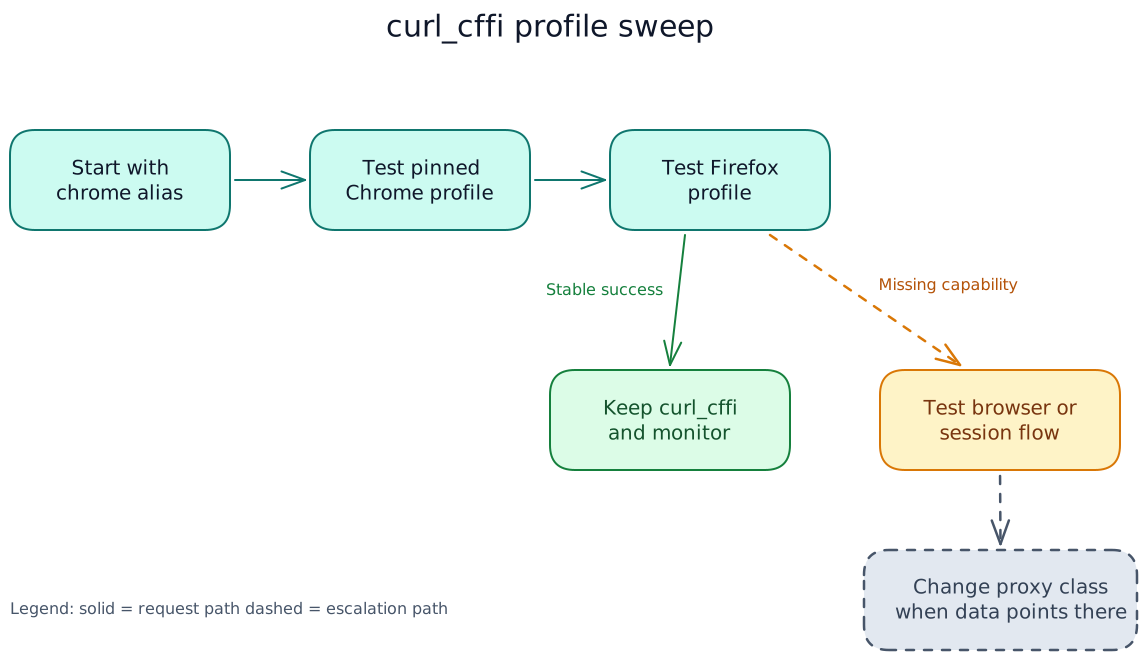
Figure 1. A small cross-family profile sweep keeps browser escalation behind measured curl_cffi results.
Profiles cannot execute page JavaScript, expose browser APIs, perform interaction, or create browser-bound state. A Cloudflare-protected JavaScript application may need a browser that clears the challenge and renders the page. A strict DataDome interstitial may require a browser even when another route behind the same provider works with firefox144.
Akamai provided the clearest boundary in Pinobyte's findings. Direct requests stayed blocked across Chrome, Firefox, and Safari profiles. The working path required a browser-established session before the pipeline could return to inexpensive HTTP requests. More profile rotation would not have supplied that capability.
Use the lightest client that meets the measured requirement. curl_cffi fits direct HTML and JSON when one profile passes. A browser fits JavaScript, browser APIs, interaction, or session establishment. Change the network path when the profile and browser tests point to IP or ASN reputation.
Pinobyte's web scraping tools comparison describes the wider engine tradeoffs.
Conclusion
Do not give up on curl_cffi after one failed chrome request. Test the latest alias, a pinned Chrome profile, and a pinned Firefox profile under matched conditions.
Pinobyte measured two sharp changes from this process: about 0% to about 80% behind a Cloudflare TLS gate, and 0/6 to about 7/10 on a DataDome-protected server-rendered route. Across the broader hard-target workload, about 80% of protected resources stayed on the direct curl_cffi path.
Escalate when the profile matrix identifies a capability that HTTP cannot provide. Until then, another supported profile may be the cheapest useful test.
FAQ
Is changing the User-Agent enough to change a TLS fingerprint?
No. The User-Agent is an HTTP header. The TLS and HTTP/2 connection behavior comes from the client stack. Use an impersonation profile when you need to change both the browser-family connection pattern and related headers.
What is the difference between chrome and chrome120?
chrome follows the latest Chrome profile available in the installed curl_cffi version. chrome120 pins the Chrome 120 profile. Use the alias for a current baseline and the pinned name for reproducible comparison.
How many profiles should I test?
Start with three candidates: the generic Chrome alias, a pinned Chrome profile, and a pinned Firefox profile. Expand the set when results point to another browser family or a specific fingerprint version.
Can a profile change move success from 0% to 80%?
Yes. Pinobyte measured that change behind a Cloudflare TLS gate while holding the request and IP conditions constant. That swing is why one failed profile should not trigger browser escalation.
When should I switch from curl_cffi to a browser?
Switch after a controlled profile sweep shows that the resource needs JavaScript execution, browser APIs, interaction, or browser-established session state. Keep direct HTTP when one profile provides stable usable responses.

