

Introduction
We built a web application that helps users find the best car deals across multiple marketplaces. Then we transformed it into a ChatGPT App - no installation required, no onboarding friction, just natural conversation that launches the experience when users need it.
Watch the demo below showing the same application running in two ways:
Traditional web app: User visits the site, fills a form, waits for results, sees a table of car listings.
ChatGPT App: User types "Find me a BMW X3 under $50k with less than 100,000 miles" in ChatGPT. The assistant understands the intent, launches our app inline, and streams real-time progress as AI agents search across Autoscout, Mobile.de, and Otomoto. Results appear as an interactive widget, and follow-up questions work seamlessly: "Show me only the 2020+ models" or "Which one has the best price?"
The second experience is powered by ChatGPT Apps - OpenAI's new distribution channel that turns conversational AI into a marketplace. For technical leaders, this is the App Store moment for AI-native software. The infrastructure is live, early adopters are staking territory, and the window to establish your product in this ecosystem is open now.
This article walks through the architecture, tech stack, and real-world implementation patterns we used to build it.
// Project Goals//
Our objective was straightforward: take an existing web application and make it accessible inside ChatGPT without rebuilding from scratch. Specifically:
- Reuse existing architecture - Leverage our production car search engine (AI agents, marketplace scrapers, pricing analysis) as-is
- Preserve the UX - Maintain the visual design and user experience from our original web app
- Enable follow-up questions - Support conversational queries like "Show me the cheapest one" or "Filter by year 2020+"
// Key Challenges //
Building a ChatGPT App isn't just exposing an API. Here are the non-trivial challenges we solved:
- Long-running operations - Our search takes around 60 seconds, but MCP tool calls timeout. Can't block waiting for results.
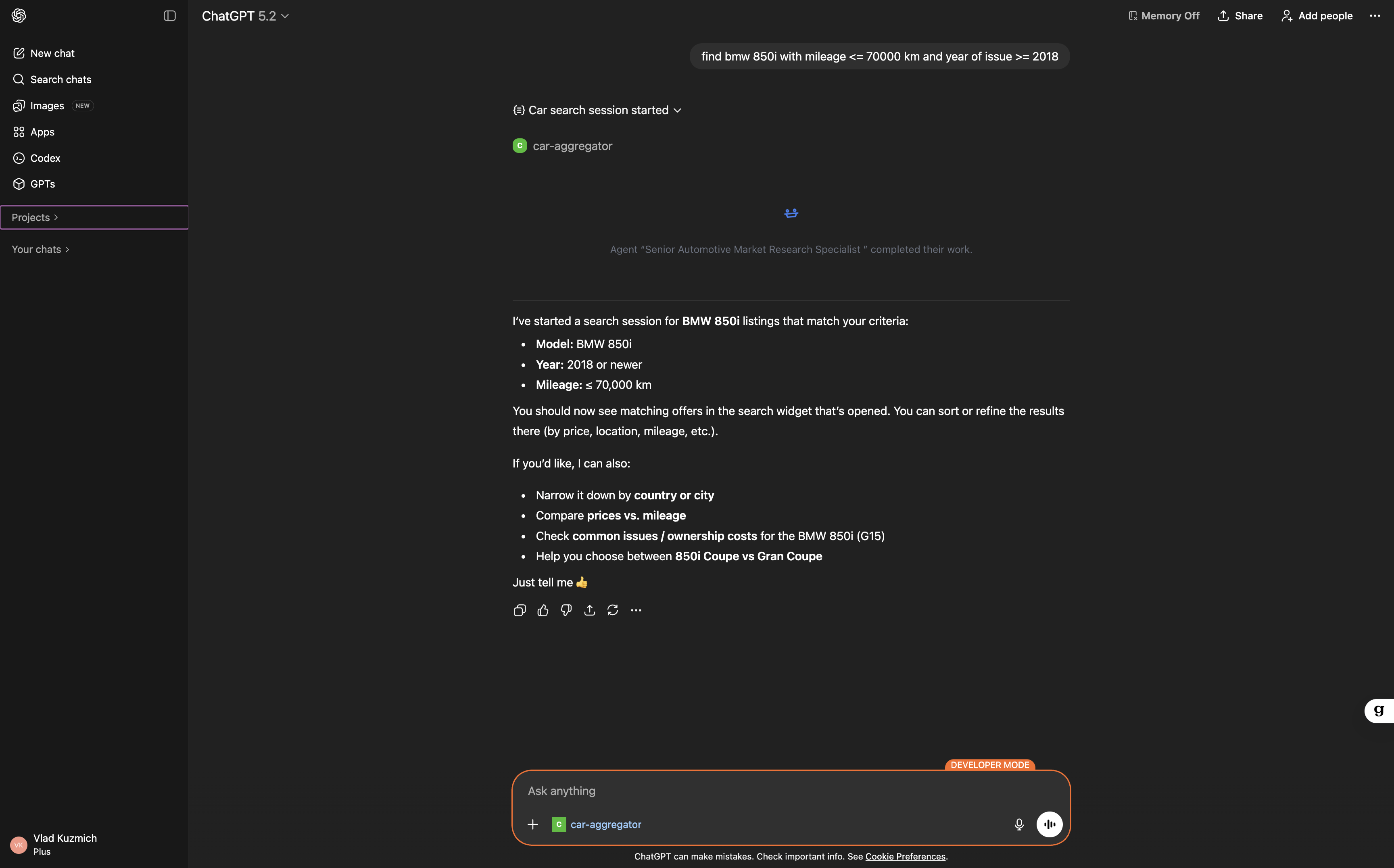
- Real-time progress - Users need live feedback during the wait. Had to stream progress updates to the iframe.
- Session state passing - Tool creates session, returns iframe, but iframe needs to know its session_id.
- Local development - ChatGPT requires HTTPS. Used ngrok to expose localhost securely.
// Technical Architecture: How It Works //
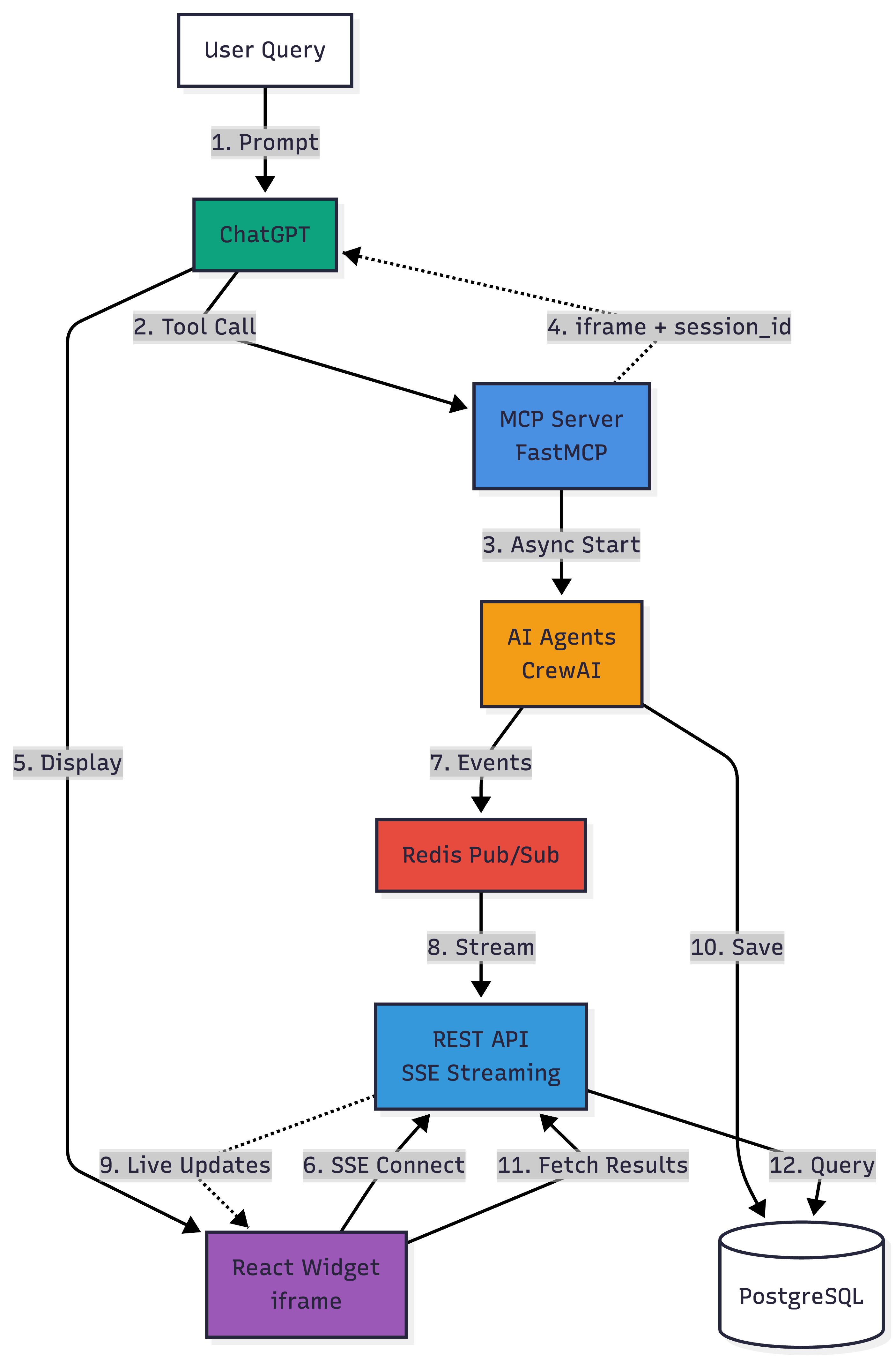
Our solution combines Model Context Protocol (MCP), AI agents, real-time streaming, and React to deliver a seamless ChatGPT experience.
System Components
- MCP Server (FastMCP) - Exposes two tools:
start_search_session_widget(creates session, returns iframe) andget_session_results(retrieves stored offers for follow-up Q&A).
Built with FastMCP, a Python framework that handles the Model Context Protocol handshake. - AI Agent Orchestration (CrewAI) - CrewAI coordinates multiple agents that parse user intent, search car marketplaces, analyze pricing, and format results.
- Event Streaming (Redis) - Redis pub/sub broadcasts CrewAI events to any listening clients.
- REST API with SSE (FastAPI) - FastAPI exposes Server-Sent Events endpoints that subscribe to Redis channels and stream events to connected iframes. This is how we show live progress without blocking the MCP tool call.
- React Widget - Rendered as an iframe inside ChatGPT, the widget connects to SSE independently, displays animated progress ("Searching Mobile.de...", "Found 12 offers..."), and fetches final results when the search completes.
- PostgreSQL - Persistent storage for search sessions and car offer data, enabling follow-up questions hours or days later.
Execution Flow
- User types a query in ChatGPT
- ChatGPT suggests using our Custom App and sends a tool call to the MCP server
- MCP server starts an async AI agent session
- MCP immediately returns
structuredContentwith iframe HTML (doesn't wait for results) - ChatGPT displays the iframe in the conversation window
- React app inside the iframe connects to our REST API via Server-Sent Events (SSE)
- Meanwhile, AI agents publish progress events to Redis pub/sub
- REST API subscribes to the Redis channel and streams events back to the iframe
- User sees live progress: "Searching Mobile.de...", "Found 12 offers..."
- When complete, agents store results in PostgreSQL
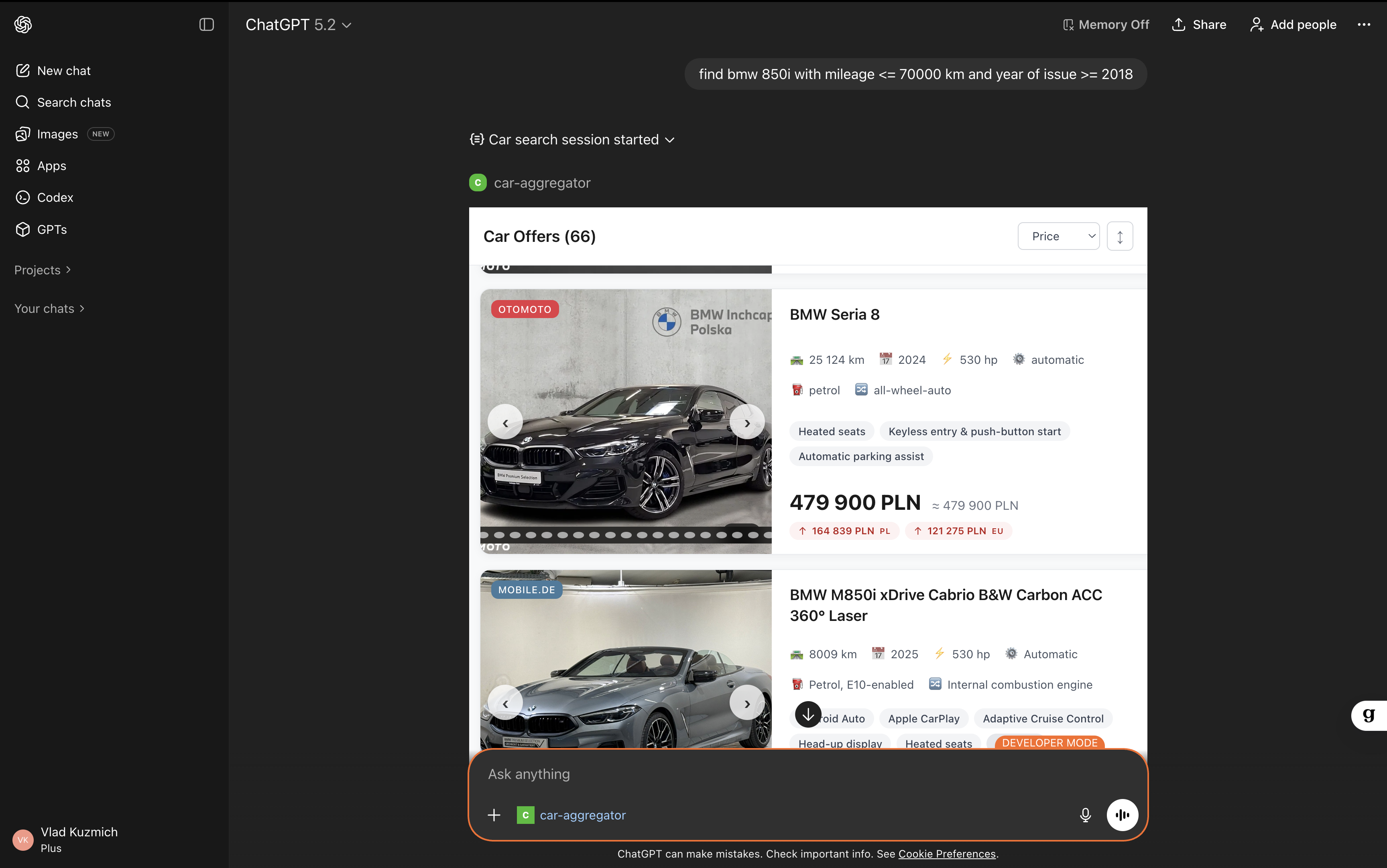
- Iframe fetches final offer data from the API
- User can ask follow-up questions, and ChatGPT uses a second MCP tool to query stored results
Tech Stack
- FastMCP (0.2.x) - Python framework for building MCP servers with stateless HTTP support
- CrewAI (0.80+) - AI agent orchestration framework for multi-step workflows
- FastAPI + sse-starlette - API layer with Server-Sent Events for real-time streaming
- Redis (5.x) - Pub/sub messaging for event broadcasting
- PostgreSQL - Session and offer persistence
- React + Vite - Widget frontend with
@microsoft/fetch-event-sourcefor SSE - Docker Compose - Local development stack orchestration
// How to Approach Building ChatGPT Apps //
Practical lessons from building a real production ChatGPT App:
- Start with one clear user intent - Don't port your entire app. Pick ONE thing users ask for most. Our example: "Find cars matching my budget." One intent = one tool.
- Make tool descriptions crystal clear - ChatGPT chooses your app based on descriptions. Write like you're explaining to a colleague.
- Good: "Use this when the user wants to search for cars. Accepts 'BMW under $40k' or 'diesel SUV'."
- Bad: "Car search tool" (too vague). Always start with "Use this when..."
- Use widgets for anything taking over 10 seconds - Tool calls timeout around 30 seconds. Our searches take 60 seconds. Solution: return widget immediately, show real-time progress. Don't block, show users what's happening.
- Test with real prompts before you build - Write 10-15 prompts users might say.
- Should trigger: "Find cheap BMWs in Germany", "I need a family car under €30k".
- Should NOT trigger: "What's the weather?", "Book a flight". Broad descriptions make ChatGPT suggest your app at wrong times.
- Keep components simple - Our widget: (1) Shows loading spinner with progress, (2) Displays results as cards. That's it. No editing, no forms, no wizards. Just viewer mode. Users interact via natural language, not UI controls.
- Return data ChatGPT can reason about - Widget shows pretty UI, but ChatGPT needs text/data for follow-ups. We return markdown-formatted listings so ChatGPT can analyze when users ask "Which is cheapest?" or "Show only diesel."
Bottom line: Pick one high-value task, make tool descriptions specific, use widgets for slow operations, test with real prompts. That's 80% of success.
// The End Result: What Users See //
1. Real-time events streaming
2. Car offers listing
// Conclusion //
ChatGPT Apps represent a fundamental shift in how software reaches users. Instead of competing for attention in crowded app stores or relying on SEO and ads, your product can appear inline during natural conversations with millions of ChatGPT users.
We built our car expert ChatGPT App in three weeks using open-source tools: FastMCP, CrewAI, FastAPI, Redis, and React. The architecture is production-ready: stateless HTTP servers, horizontal scaling via Redis pub/sub, and containerized deployment with Docker Compose.
Want to see the complete implementation? The entire source code - MCP server, AI agents, React widget, SSE streaming, Docker setup, and full documentation - is available on GitHub: github.com/pinobyte/car-aggregator-using-crew-ai-agents
// FAQ //
What are ChatGPT Apps?
ChatGPT Apps are integrations built with OpenAI's Model Context Protocol (MCP) that let users interact with third-party services directly inside ChatGPT conversations. They combine conversational AI with embedded UI components.
How do I handle authentication?
MCP supports OAuth 2.1 with PKCE. Users authorize your app once, and ChatGPT includes access tokens in subsequent tool calls. For our car search app, we don't require auth (public data), but we'd implement OAuth for user-specific features.
What's the deployment model?
MCP servers must be HTTPS-accessible. We use Docker Compose locally (with ngrok for testing) and plan to deploy to Kubernetes with an NGINX ingress controller. FastMCP's stateless HTTP mode makes horizontal scaling trivial.
How much does it cost to run?
Our stack (FastAPI + Redis + PostgreSQL + OpenAI API calls) costs ~$50/month for 1,000 searches. CrewAI uses GPT-4 for agent reasoning, which is the primary cost driver. Optimizing prompts and caching reduce costs significantly.