


TL;DR
You can build a reusable Claude web scraping skill in about 10 minutes for public, permitted, uncomplicated pages. Give Claude five rules:
- Start with plain HTTP.
- Verify that the expected records were returned.
- Try a browser-like HTTP client only when plain HTTP fails.
- Use a real browser only when JavaScript creates the data.
- Stop on login, CAPTCHA, explicit denial, or unclear permission.
This guide turns those rules into your own SKILL.md file.
Introduction
Claude can produce scraping code from a URL in seconds. The first run still leaves a verification problem: the script may collect the requested records, or it may save a login page, consent screen, or empty application shell with HTTP 200.
A useful Claude skill defines success before it chooses a library. It collects the URL, record fields, output format, minimum count, and an expected value. Then it starts with the lightest transport and moves only when a failed data check justifies the next tool.
This guide shows you how to store that procedure in one SKILL.md file and test it in Claude. The ten-minute scope covers permitted public pages. Authenticated pages, CAPTCHAs, protected workflows, scheduling, proxy operations, monitoring, and source maintenance need more engineering time and an explicit access decision.
Why Claude's First Scraper Often Fails
Developers asking why Claude still needs browser inspection, request traces, and page context are running into the same constraint: Claude needs page evidence and a test for the desired output. It can fix a weak selector or choose a browser for client-rendered content. A prompt cannot grant permission, remove a CAPTCHA, or turn restricted access into public access.
You need an ordered diagnostic loop:
- Fetch the lightest representation.
- Check that the requested records exist.
- Escalate one rung only when the check explains why.
- Stop when the failure concerns access rather than rendering.
Following this order keeps Claude from launching a browser for usable HTML or treating a status code as a data-quality test.
Use a Simplest-First Scraping Ladder
Use three implementation rungs and one stop decision.
| Rung | Method | Use it when | Pass condition |
|---|---|---|---|
| 1 | Requests | The returned HTML or JSON contains the fields | Expected selector or JSON path exists and accepted record count passes |
| 2 | curl_cffi | A normal browser gets the public page but plain HTTP shows transport incompatibility | The same field and count checks pass without custom fingerprints |
| 3 | Playwright | Page JavaScript or a permitted interaction creates the data | The expected records appear in the rendered DOM and export correctly |
| Stop | Access review | Login, CAPTCHA, explicit denial, robots.txt conflict, or unclear permission appears | The user resolves access and policy before more code is written |
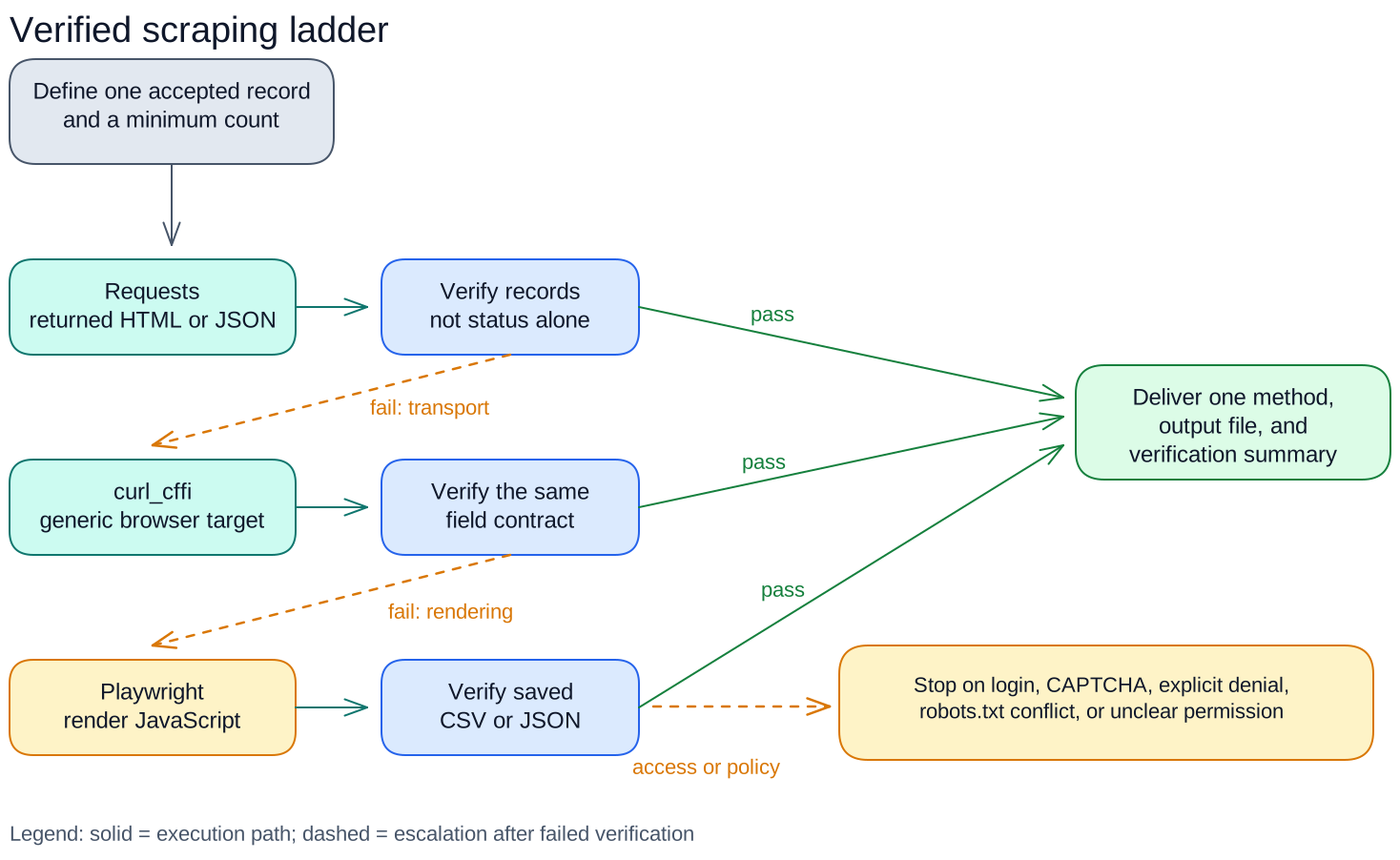
Figure 1. Solid lines show execution within a rung. Dashed lines show escalation after failed verification.
Level 1: Requests
Start with Python Requests. Set a timeout and call raise_for_status() to catch transport errors. Then verify that the response body contains the requested records.
Level 2: `curl_cffi`
Use curl_cffi when a normal browser loads the permitted public page but plain HTTP receives an incompatible response. Its requests-like interface can use a current generic browser target without launching a browser process.
Keep this level generic. Custom fingerprints, per-domain profiles, and rotating network identities belong in a controlled production system.
Level 3: Playwright
Use Playwright when JavaScript or a permitted interaction creates the data. A browser adds downloads, memory use, dependencies, failure modes, and longer runs, so do not start there when HTML or JSON already contains the fields.
Know When to Stop
You may see a fourth category called a stealth browser. It changes how automation presents itself. Use it only on systems you own or have written permission to test. Tell Claude to stop before that level because a public-page skill cannot decide the access question for you.
Verify the Result After Every Step
Claude needs a compact contract that distinguishes a real page from a successful request.
Check the final URL, status, and content type first. Then test the data:
- Did the expected selector or JSON path appear?
- Did the scraper accept at least the agreed number of records?
- Are all required fields non-empty?
- Do the first, middle, and last records look plausible?
- Does the title or visible text contain login, consent, challenge, or error language?
- Does a second run return the same field names?
Save the exported file before declaring success. Console output can hide quoting, encoding, and schema errors that appear in CSV or JSON.
After a failed check, Claude should report what it saw. "Zero records in text/html" points toward the wrong page or selector. "Twenty records with four required fields" supports delivery. "HTTP 200" says little about either case.
Start With a One-Off Prompt
Test the workflow as a normal Claude prompt before you save it as a skill. Replace the bracketed values with your task requirements.
Build the smallest permitted scraper for this public page.

Goal
- URL: [PASTE URL]
- One record contains: [FIELD 1], [FIELD 2], [FIELD 3]
- Output: [CSV OR JSON] saved to [FILENAME]
- Acceptance test: at least [N] records, all required fields non-empty
- Expected example, if known: [VALUE]
- Refresh or rate limit: [ONE RUN / SCHEDULE AND LIMIT]

Before coding
1. Confirm the requested page is public and within the scope I described.
2. Inspect robots.txt and note relevant rules. Treat robots.txt as crawler guidance,
   not as permission by itself.
3. Stop and ask me before continuing if the workflow needs login, personal data,
   CAPTCHA, concealed automation, or access that the site denies.

Use this order
1. Start with Python Requests and a finite timeout.
2. Verify the response body contains the expected record selector or JSON path.
3. If a normal browser gets the permitted public content but Requests returns an
   incompatible response, try curl_cffi with a current generic browser target.
   Do not create a custom fingerprint or domain-specific evasion profile.
4. Use Playwright only if page JavaScript or a permitted interaction creates the data.
5. If a challenge or explicit denial remains, stop. Do not add CAPTCHA solving,
   proxy rotation, stealth plugins, credential capture, or access-control bypasses.

Verify after each attempt
- Record requested URL, final URL, status, and content type.
- Reject login, consent, challenge, rate-limit, and generic error pages.
- Require the expected selector or JSON path.
- Require at least [N] accepted records.
- Require every requested field on every accepted record.
- Inspect at least three sample records.
- Run the final scraper twice and confirm the schema stays the same.
- Open the saved CSV or JSON and verify its row count and field names.

Deliver
- One scraper file with a main entry point.
- requirements.txt with direct dependencies only.
- The saved CSV or JSON file.
- One run command I can copy.
- A short verification summary: chosen method, final URL, accepted record count,
  required-field completeness, and any remaining limitation.

Use one transport in the final script. Remove abandoned code and dependencies.
Prefer stable labels and semantic attributes over long generated CSS class chains.
Replace the bracketed values when you use the prompt for one job. In the reusable skill, ask Claude to collect those values from the user instead of hard-coding a site.
Turn the Workflow Into a Claude Skill
Create the skill file
Create a folder named scrape-public-pages. Add one file named SKILL.md. Start the file with YAML metadata, then tell Claude which inputs to collect:
---
name: scrape-public-pages
description: Build and verify small scrapers for permitted public pages, with CSV or JSON output.
---

# Scrape public pages

Before writing code, collect the target URL, required fields, output format,
filename, minimum record count, and one expected value from the user.
Ask for any missing value.
Claude uses the description to decide when to load the skill, so name the task and output. Keep the file generic. Put each URL, selector, and field list in the user's request.
Add the method and proof contract
Copy the Before coding, Use this order, Verify after each attempt, and Deliver sections into SKILL.md. Leave out the one-job Goal block because the opening instructions collect those values.
Keep the stop conditions so Claude does not treat login, CAPTCHA, or denial as a library problem. Keep the acceptance checks so it can prove that it collected the requested records.
Check the package
Your complete package can contain one file:
scrape-public-pages/
└── SKILL.md
Confirm that the filename uses uppercase SKILL.md, the YAML starts on line one, and the instructions contain no credentials or site-specific values. Add reference files when the procedure outgrows one readable document.
Add the skill to Claude and test it
For Claude on the web:
- Compress the folder you created.
- Enable code execution.
- Open Customize > Skills.
- Choose Create skill.
- Upload your ZIP.
For Claude Code, copy the folder to ~/.claude/skills/scrape-public-pages/ for personal use or .claude/skills/scrape-public-pages/ inside one project.
Ask Claude: Use the public-page scraping workflow for [permitted URL]. Return [fields] as [CSV or JSON], with at least [N] complete records. Claude should confirm the input contract, begin with Requests, and report the result before escalating. If Claude does not load the skill, name the task and output more clearly in the description.
Figure 2. The skill stays generic; each request supplies the URL, fields, output, and acceptance target.
A skill packages instructions and checks. It does not run continuously or expose a network tool. You still review the generated code and decide whether the source permits collection.
Three Common Mistakes This Workflow Avoids
Asking Only "Scrape This URL"
That request omits the output contract. Claude can return prose, a script, or incomplete records and still appear to complete the task. Specify the fields, format, record count, and validation requirements.
Starting With Playwright
Starting with a browser hides the diagnosis. You cannot tell whether JavaScript was required or plain HTTP would have worked, and you inherit a browser install before you prove the need.
Trusting HTTP 200
A successful status checks the server exchange, not the data. Sites can return soft errors, login pages, consent screens, and application shells with HTTP 200. Count accepted records and inspect required fields.
For a broader comparison of parsers, browsers, no-code tools, and hosted options, see Pinobyte's web scraping tools comparison.
Choose a Script, Skill, MCP Server, or API
The same extraction logic can serve four different reuse patterns.
| Shape | Good fit | What it adds | Operating burden |
|---|---|---|---|
| Script | One person runs one known job | A repeatable command and file output | You maintain code and environment |
| Claude skill | You want Claude to rebuild or adapt small scrapers with the same rules | Reusable procedure, safety boundary, and verification contract | You review generated code and rerun it |
| MCP server | Claude or another client needs a callable scraping tool on demand | Tool schema, server transport, and client integration | You operate the server, permissions, logs, and failures |
| API | An application or schedule calls collection without a conversation | Stable interface, authentication, quotas, and automation | You operate or buy a service contract |
Build MCP when the tool itself needs to persist beyond one Claude task. The protocol lets a server expose tools, resources, and prompts to an AI client. A skill is the right first artifact for this ten-minute workflow. It captures how Claude should choose and verify a method. Convert a stable scraper into MCP or an API after repeated use justifies the operating surface.
Limits and Responsible Use
Use public data you have permission to collect. Before scraping:
- Review the site's terms and
robots.txt. - Identify your scraper when appropriate.
- Limit the request rate.
- Store only the data you need.
RFC 9309 defines robots.txt as crawler guidance, not access authorization. Do not use this workflow for accounts, personal data, CAPTCHAs, explicit denials, or access-control bypasses.
If the source offers an official API or export, test it before browser automation. For business-critical collection, add monitoring, data-quality alerts, change detection, and a named maintenance owner.
Tell Claude to stop when the problem concerns access. This keeps it from treating an access problem as another package to install.
Conclusion
A Claude web scraping skill needs an order and a proof contract. Start with Requests, move to curl_cffi only for a measured transport mismatch, and launch Playwright only when JavaScript creates the data. Verify records after every rung.
Ten minutes is enough to create the skill and test whether a permitted public page fits the workflow. Saving the method in SKILL.md makes the next request consistent. MCP and APIs come later, when you need a running tool instead of another generated script.
FAQ
Can Claude scrape a website without coding knowledge?
Claude can write and run a small scraper when you provide the URL, fields, output format, and acceptance test. You still need to confirm permission and review the exported records. Authentication, protected access, and production operations require more expertise.
Should a Claude scraper start with Playwright?
Start with Requests when the required data appears in returned HTML or JSON. Use Playwright when page JavaScript or a permitted interaction creates the data. This order reduces dependencies and makes failures easier to diagnose.
What is the difference between a Claude skill and an MCP server?
A skill gives Claude reusable instructions and reference material. An MCP server exposes running tools, resources, or prompts through a protocol. Use a skill to standardize how Claude builds scrapers. Use MCP when Claude needs to call an operated scraper on demand.
Does HTTP 200 mean the scraper worked?
No. HTTP 200 means the server returned a successful status. The body may still contain a login screen, consent page, application shell, or soft error. Verify the expected selector, accepted record count, required fields, and saved output.

